Getting Started with Deno
The spiritual successor to NodeJS

Dating back to Node.js creator Ryan Dahl’s 2018 presentation 10 Things I Regret about Node.js, the programming community was anticipating his latest creation. Fast forward to May 2020 and Deno — A secure runtime for JavaScript and TypeScript — has released version 1.0.
Node.js as a JS runtime environment has become an absolute backbone for technology stacks. Any time you see the letter “N” in a tech stack, such as MEAN, that’s most likely Node.
With great success comes longevity and with longevity comes legacy challenges, some of which are too deeply ingrained in the architecture to be addressed.
This is where Deno comes in. If you’re curious about the language, as a seasoned developer or a fledgling self-starter who learned JavaScript, it’s undeniably exciting to get started on something that’s this new.
In this article, we’ll introduce what makes Deno special, figure out if Deno is right for you, and walk through how to get started with your first Deno script.
What Makes Deno Special?
Deno is a JavaScript server language built for TypeScript and designed to improve on shortcomings that exist in Node.
First things first, if you’re not familiar with TypeScript, it is a super set of JavaScript. The primary distinction between the two is that TypeScript is a strongly typed language, meaning the data type must be defined when creating variables. While the convenience of JavaScript’s loosely-typed nature may be appealing, it is generally easier to identify bugs in a strongly-typed language. If this is confusing, just think of TypeScript as a strongly-typed JavaScript.
In addition to being built for TypeScript, Deno supports direct module imports via URL, similar to how web pages will import fonts, JS libraries, and other external resources. This removes the need of package.json/node_modules, essentially a grocery list of third-party modules that an app needs to function. The end result is a much smaller app footprint and easier version control done through directory structure by the module’s administrator.
Third, Deno prioritizes security as a default configuration. Access to the file system, network, and environment are not readily available — unlike Node — and require explicit permission to access.
Is Deno Right for Me?
Reflecting on the core design principles of Deno (security, module management, and TypeScript), if those features are big ticket priorities for you, then it makes sense to invest some time and energy into Deno.
However, the biggest dinosaur in the room is that Deno is in its absolute infancy (v 1.0.0). So it’s not the right option if you’re looking to move production projects today. In fact, Dahl even stated in a recent talk that “Node isn’t going anywhere”.
So, from the set of people who are interested in Deno’s core principles, enthusiasts and relatively new self-starters are the ideal target audience at this time. If you’re a long-time Node.js enthusiast and want to see what the next generation could look like, then check out Deno. If you’re new to JavaScript runtime environments and want to learn something brand new, or are intimidated by the ocean of existing Node.js content, then check out Deno.
How Do I Get Started?
The first thing we have to do is install Deno. This step will differ depending on your operating system and preferred method of installation.
For Linux/OSX users, you can simply install Deno using Shell.curl -fsSL https://deno.land/x/install/install.sh | sh
For Windows users, run the following command in PowerShell.iwr https://deno.land/x/install/install.ps1 -useb | iex
For more options, view their official installation page.
After installing, type deno --help for a list of resources.
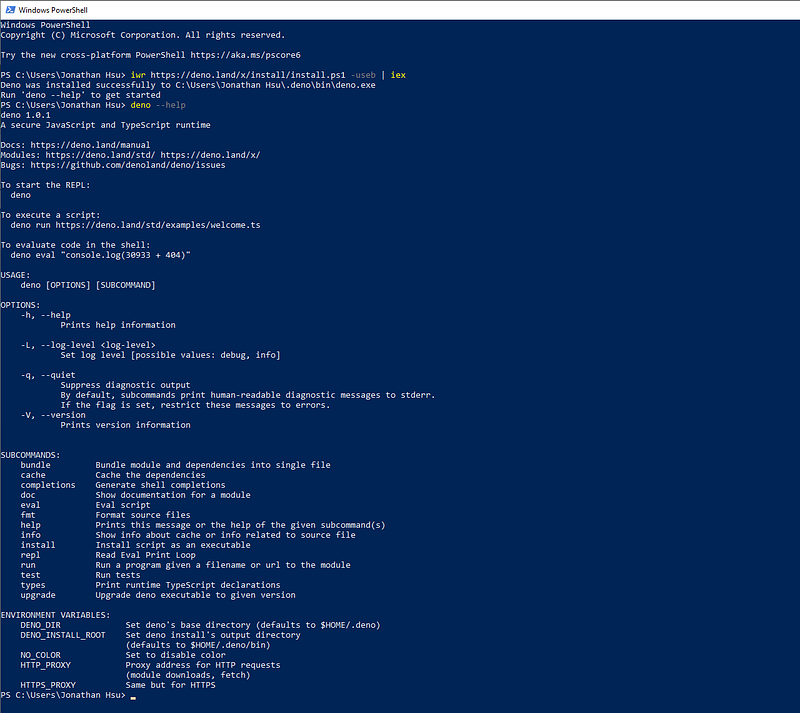
Now that we’ve installed Deno, we’re going to begin with a very simple server app that illustrates all three of Deno’s key features.
Our First Deno Server
To begin, create a new file called server.ts, then add the first line:import { serve } from "https://deno.land/std@v0.50.0/http/server.ts";
This line is importing serve module from a URI resource, something that would have required an npm install if we wrote this is Node.
Next, let’s create our server and set the listening port to 8000.const server = serve({ port: 8000 });
Using the serve() function, we pass an object with the key-value pair port and 8000. This is stored in a constant named server.
Finally, we’ll define a message and add an asynchronous loop using for await...of to define what happens when a request hits our server.const greeting:string = "I'm a Deno server, you found me!";for await (const req of server) {
req.respond({ body: greeting});
}
Each request that his our server is assigned to the variable req where we set the response body to our greeting variable. Notice the :string after our constant’s name? That’s an example of type setting, a core component of TypeScript.
Running Our Server
Now that we’ve written the code, it’s time to spin ‘er up. In our terminal, start the server by typing deno run --allow-net server.ts.
Notice how we have to specify --allow-net in our run command. If you skip that part you’ll hit a PermissionDenied error. You won’t see anything else in the terminal (because we didn’t write anything) but rest assured our test server is up and running. In your browser, navigate to localhost:8000 and see for yourself!
Conclusion
In summary, Deno is an emergent JavaScript runtime environment designed upon various shortcomings in Node.js. With a security-first mindset and decentralized package control, Deno has native support for TypeScript — a statically-typed super set of JavaScript.
Although very new, Deno’s architect, Ryan Dahl, was also the creator of Node.js. For more information, visit the official Deno manual.
Have you been following Deno or tried it out since v 1.0.0 was released? Share your experiences, questions, and feedback below. Follow Code 85 for more plain language guides. Thanks for reading!