How to Query Parent and Child Relationships in SOQL
Easily query an object’s parent or child data

SOQL — Salesforce Object Query Language — is a mechanism for retrieving object data that resembles SQL. While SQL includes operations such as INSERT, ALTER, and DELETE, SOQL is confined to retrieving data…effectively SELECT statements only.
While this may seem confining, the reality is that SOQL has many quality-of-life improvements for working with Salesforce objects (sObjects). One of these perks is the way in which related parent and child data can be automatically retrieved without using JOIN statements.
In this article, we’ll go over two examples: how to include parent object data in a SOQL query and how to include child object data in a SOQL query. The examples will use standard sObjects, but the concepts can be applied to custom sObjects with the most minor of modifications.
Querying Parent Object Data
To illustrate this scenario, we’ll work through a query to include the account name alongside a request on the Contact object. The basic query for requesting contacts would be as follows:SELECT Name FROM Contact
Since Contact has a Lookup relationship with the Account sObject, requesting a field within Account (the parent sObject) is as simple as including the field(s) in the list with the Account. prefix.SELECT Name, Account.Id FROM Contact
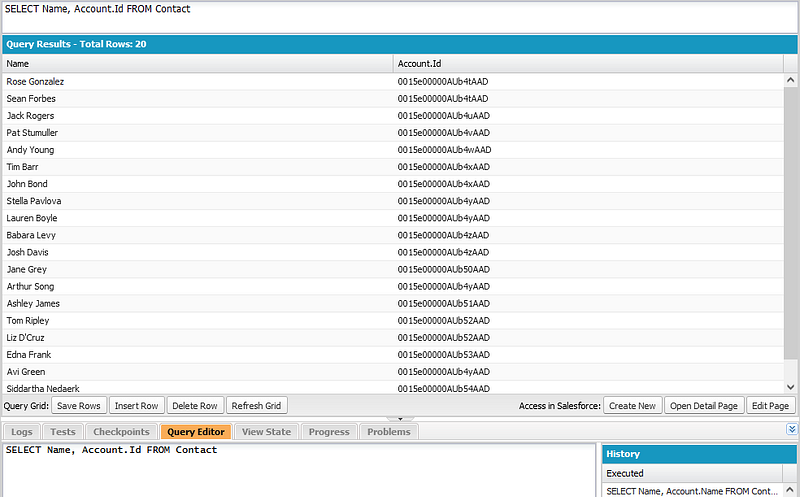
If you are familiar with SQL, this is a 🤯 moment…it was for me. For those who are not, this is what a SQL equivalent would look like.SELECT Name, Account.Id
FROM Contact
LEFT JOIN Account ON
Account.Id = Contact.AccountId
Essentially, SOQL is intelligent enough to understand that sObjects have relationships and when we want data from a related object it should be naturally filtered on the base request.
Querying Child Object Data
In the previous example, we illustrated that SOQL is aware that sObjects have defined relationships. This time we’re going to go the other direction on the ladder, making a request to the Account sObject that includes child data from the Contact sObject.
When making a query to an sObject, we can simply include child fields within the field list as a subquery nested in parentheses. The connected child sObject will be properly filtered to the parent — no JOIN, no WHERE needed.SELECT Id, (SELECT Name FROM Contacts) FROM Account
A few points to keep in mind when including child object fields in queries…
- We use the plural ‘Contacts’ and not ‘Contact’ within the subquery
- The subquery is returned as a nested List of sObjects
- An empty subquery is NULL and not an empty List
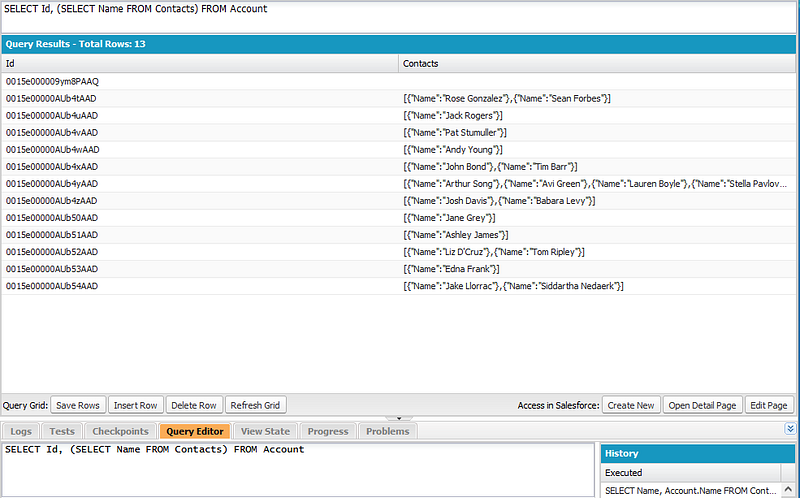
The subquery can follow just about all normal rules for a SOQL request — feel free to list multiple fields or add a WHERE clause, but don’t try to nest another subquery because you’ll receive an error.
Conclusion
While Salesforce can feel overwhelming for the uninitiated, there are many quality-of-life mechanisms in place that optimize the tools for the platform. The simplicity of including parent or child sObject fields in SOQL is a prime example.
To summarize everything from this introductory guide:
- Use the sObject name with the dot accessor for parent fields
- Use parenthesis and a subquery for child fields
May the ‘Force be with you 😉
Please share your experiences, questions, and feedback below. Follow Code 85 for more plain language programming guides. Thanks for reading!