Python Getting Started Guide
Your first three steps when learning Python

Starting off on the right foot is so important when deciding to learn a programming language. With a plethora of articles, there’s no shortage of resources — which can be overwhelming.
We’re throwing our hat in the ring with a three-step guide to set up your work space and verify everything is operational.
Download and Install Python
Surprisingly, downloading an installing a programming language can be challenging and require some troubleshooting due to operating system types and versions. Regardless, your first step should be to visit Python’s official website and download the latest stable release for your computer.

There are common pitfalls depending on your operating system, but to confirm you’ve installed python correctly, go to your command line/terminal and type one of the following commands below:# if Python 2 and 3 are both installed (OSX especially)
python3 --version# if only Python 3 is installed
python --version
Since troubleshooting is often system-specific and requires some trial/error, use the comments section below for help. Be sure to include your operating system and version as well as any error messages you are receiving.
After installing Python and verify that it works, you want to make sure that you have access to pip, which is a package manager for Python. Basically, pip allows you to install, upgrade, remove published Python packages from the Python Package Index (PyPI).
To verify pip is working well, simply type pip in your terminal and the help menu should be displayed.
Download and Install Visual Studio Code
Now that we have the Python interpreter installed and access to its package manager, it’s time to set up our actual work environment. Technically, you can write Python in the command line and the interpreter comes with a built-in text editor, but there are freely available tools that are superior and will improve your experience.
Sublime Text, Spyder, Atom, and Notepad++ are some alternative editors if you do not want to use VS Code.
Visual Studio Code is a integrated development environment (IDE) published by Microsoft. Even if you’re a Linux or Mac fan, VS Code is an excellent software that is arguably an industry standard.
To get started, go to Visual Studio Code’s website and download the latest stable build for your operating system

After installation, open up VS Code. I like to set up my screen as shown below with an integrated terminal window.
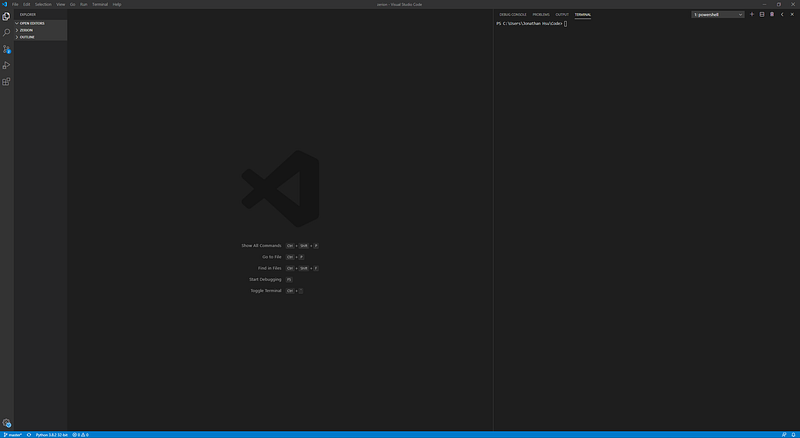
VS Code has a vast extensions library. There are so many extensions that you can install to customize the functionality of VS code, but at a minimum I recommend installing Microsoft’s Python extension.
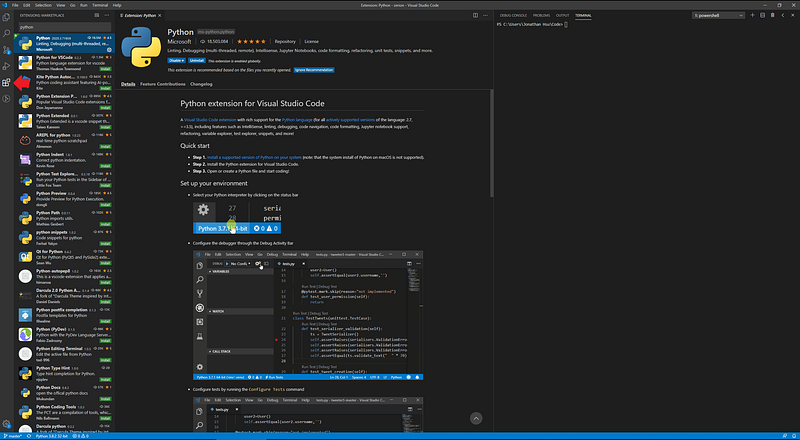
To do this, click on the Extensions menu on the left-hand side, search for Python— it will be at the top of the list — and click the install button. That’s it, you’re all set.
Create Your First Script
At this point we’ve installed and verified Python, installed and added an extension to VS Code, now it’s time to write some Python.
Create a new file in VS Code and let’s start by saving immediately. Name our file app.py something short and with a Python extension. As we begin to type, you’ll notice the text is colored. This syntax highlighting is a tremendous benefit and helps with reading your code.
Let’s start with a simple one-line file.print("Hello World")
After saving, go over to your terminal and with your prompt in the same directory as app.py, execute your file with either the python or python3 command depending on your setup.
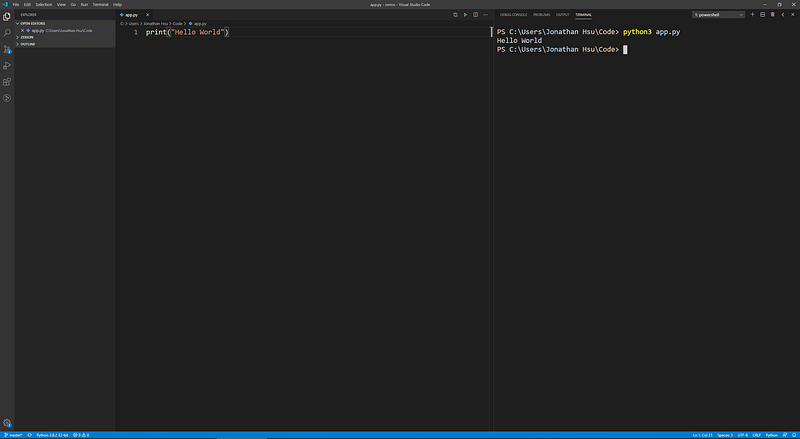
We’ll end this getting started guide by introducing variables and basic arithmetic. After deleting what’s currently in app.py, we’ll declare two variables (your birth year and the current year) then print the difference, which will give a rough estimate of your age.
A variable is a named identifier for a value. The single equal sign is called the assignment operator and will store the right-hand value to the variable on the left.
The print command can take multiple values that are separated by commas. The middle value we print is the subtraction of birth_year from current_year.
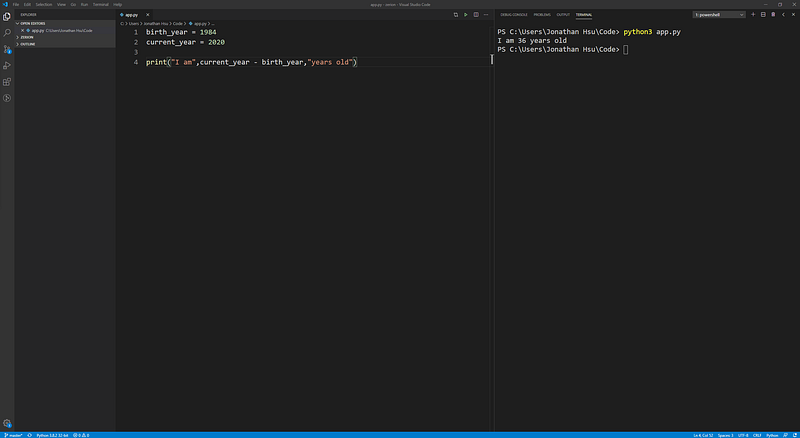
We’ve just scratched the surface of working in Python, but your work space is now set up and you’re ready to dive in to learning more about the language.
Here are some basic concepts you should look into as step two in your Python journey.
- Python Data Types and Syntax
- Basic Control Structures
- Python Style Guide (PEP 8)
- File Input/Output
Thanks for reading our guide and as mentioned above, post any questions, challenges, and feedback.