Strapi: How to Restrict Users to Edit Only Themselves
Implement a policy to custom-tailor your API

Strapi is an open source headless content management system (CMS) that’s excellent for rapid prototyping
If you’re reading this article, you’re probably mid-development in one of your first Strapi projects that includes user registration/authentication. That’s where I was when I needed this article. tl;dr: this article is a synthesis of a StackOverflow post I found on the topic, which can be found here.
Here’s the situation we’re in. We want our users to be able to update their own user information such as name or email. So, we go to the Roles section in the admin panel and select update, enabling access to that action.
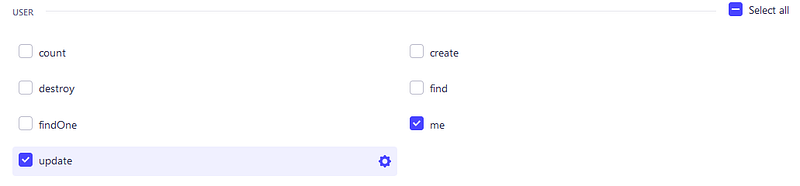
Unfortunately, doing this enables a user to not only edit their own user, but any user. That’s no good and we need to fix that. The way to do this is to implement a policy, then apply that policy on the given route.
Strapi has a great CLI tool that will help us on our way. Make sure you’re terminal is at the root of the Strapi installation and enter the command
yarn strapi generateThis will spin up Strapi’s wizard for extending your installation. We’re going to choose the following options:
- What to generate: policy
- Policy name: is-owner
- Policy location: Add policy to root of project
After that, Strapi will have produced the boilerplate code in src/policies/is-owner.js
'use strict';

/**
 * `is-owner` policy
 */

module.exports = (policyContext, config, { strapi }) => {
    // Add your own logic here.
    strapi.log.info('In is-owner policy.');

    const canDoSomething = true;

    if (canDoSomething) {
      return true;
    }

    return false;
};
This starter policy has a log message so you know when it’s loaded, a boolean variable aptly named canDoSomething and a simple if statement to control whether a true or false is returned.
In order to determine if the requestor is the owner (self) we have to compare the requestor’s user id against the user id being queried.
So we’ll import params from policyContext and user from policyContext.state then apply some logic to the definition of canDoSomething.
const { user } = policyContext.state;
const { params } = policyContext;

const canDoSomething = user.id == params.id;
Now that our policy is defined, the final step is to include our policy for the given route, which in our case is a PUT for the resource /users/:id. To do this, we’re going to create a file named strapi-server.js in the directory src/extensions/users-permissions. Inside this file, we’ll use the following code.
module.exports = (plugin) => {
    for (let i = 0; i < plugin.routes["content-api"].routes.length; i++) {
      const route = plugin.routes["content-api"].routes[i];
      if (
        route.method === "PUT" &&
        route.path === "/users/:id" &&
        route.handler === "user.update"
      ) {
        console.log(route);
        plugin.routes["content-api"].routes[i] = {
          ...route,
          config: {
            ...route.config,
            policies: route.config.policies
              ? [...route.config.policies, "global::is-owner"] // tests if policies were defined
              : ["global::is-owner"],
          },
        };
      }
    }

    return plugin;
  };
Essentially, this code is iterating over all the routes stored in the users-permissions plugin and if the route/path/handler combination matches from the if statement, then the global::is-owner policy is added to the end of the existing policies or returned by itself if there are no other policies.
After everything is saved, it’s time to test!
Using your preferred API client, set up the PUT request with the following:
- Authorization:
Bearer {{jwt}}where{{jwt}}is equal to the jwt token generated by a user - Method:
PUT - Resource:
http://localhost:1337/api/users/{{id}} - Body:
{ "data": { "email": "test.com" } }
First try with an id that matches the id from the jwt user. This should go through with a status code of 200. Now, try with a different id and you should receive a status code of 403, which is Forbidden. Note that you can use any value for the id, even one that doesn’t exist. The policy stops the request even before the controller executes and determines the id doesn’t exist.
Now that your PUT method is locked down, you’ll probably want to do the same for findOne, which is a GET request to the same resource.
What other policies do you find yourself adding to Strapi over and over? Do you have another strategy for restricting user access to only their own resources? I’d love to learn from you, so share any thoughts and feedback below!