Three Important Lessons for Self-Taught Coders to Level Up
Strategically take your skills to the next level

Coding, programming, development… whatever you call it, the skills you pick up along the way are invaluable and best of all the barrier to entry really is paper thin.
If you’ve learned to code through tutorials, courses, or just scouring the all-knowing Stack Overflow then you’re probably pretty savvy; however, you most likely picked up some bad habits along the way as well.
In this article, I’ll share my top three lessons (well, one is a tool) for self-taught coders who have built a functional foundation, but need a little guidance getting to the next level.
Lesson One: The DRY Method
Don’t Repeat Yourself. That’s what DRY stands for and it’s a critical differentiator between writing code “that works” and writing higher level “legit” code.
There are several levels to writing code that is increasingly DRY, but for now let’s use two questions to guide you.
- Am I repeating code anywhere? If you catch yourself copy/pasting code blocks then you’re probably an offender here. You don’t want your code to read like a novel. Moreover, if you have a lot of repetition in your code, updating it will be a major pain. Find similar code blocks and convert them into a function. You may need to generalize the code a bit to make it fit the multiple implementations, but that’s a good thing. You’re learning to think more methodically — this is you leveling up!
- How can I use this code again? This is the next step up the DRY ladder. If you catch yourself copy/pasting blocks from old projects into new ones and modifying them, you may be missing an opportunity to further generalize a function. As you get in this habit, you’ll steadily build a library of tools that you reach for over and over again. Consider turning these into a published package, it’s not that hard.
Lesson Two: Formatting and Linting
Assuming you’re using some sort of editor like Visual Studio Code to write in, two extensions you absolutely should have are a formatter and a linter. What are they and how are they different?
- A formatter is an opinionated tool that removes your formatting and automatically applies its own style to your code. Using one will standardize your indentation, line length, comma usage, and more. You may not like the way a formatter changes your code, but try to get used to it...the defaults are a way for a reason. I recommend Prettier if you don’t have one already.
- A linter is a tool that is intended to assess the quality of your code. You may be thinking, does formatting count? The short answer is yes, linters can handle code formatting. The longer answer is it’s best to separate the two tasks so you don’t “format as you lint.” A linter will address issues like never using a variable you defined or other “code smell” standards.
Using a formatter and a linter will yield tremendous benefit after you get used to it.
- Your code will look like other code you see. While this can be beneficial for you “looking legit” it’s actually more important that you learn to read code that’s formatted according to a standard. It will make scanning forums, repos, and projects much faster because you’re accustomed to the structure.
- You don’t have to think about it anymore. I admit, I’m the meticulous person who gets triggered by inconsistent styling and it used to take up a considerable amount of my time. I’d even try different format structures to see “what looked good.” Now, I have my formatter and linter set up so every time I hit save, they run automatically — Jesus, take the wheel. But, I’m faster now and more focused.
- They keep the family happy. If you’ve ever worked on a project as part of a team, or even inherited somebody else’s code, you know what I’m talking about. Tasking the formatter and linter with style and basic code quality set a baseline standard across contributors, which helps keep the peace.
Lesson Three: GitHub Copilot
I said in the beginning one of the lessons was a tool — well it’s this one. If you’re not using GitHub Copilot, get it now. I was skeptical for a long time, but I felt like a fool once I took the leap of faith. It is probably the best $10 I spend every month — $8 if you pay annually.
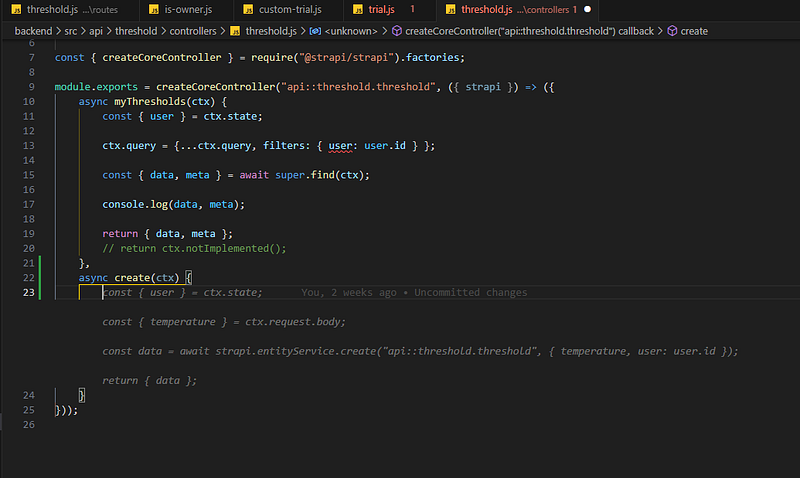
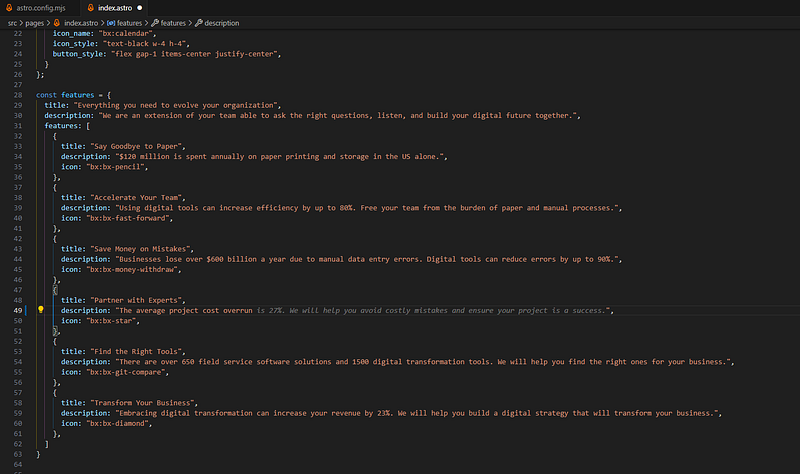
GitHub Copilot has two flavors to itself. The first is a truly remarkable engine for content-completion suggestions. I say content-completion because honestly it even accelerates me writing website text.
Here’s two screenshots of completion suggestions.
The second flavor is a chat-based tool that has been the biggest accelerator to my development (pun intended). The biggest reason? I’m not ashamed to ask Copilot anything!
Removing the anxiety of asking a “dumb question” in a forum or Discord server has led me to “ask for help” much sooner, minimizing the time I’m stuck and and helping to maintain forward momentum.
Aside from asking for help when you’re stuck, I’ve also found it’s a great learning tool for reviewing your code after the fact. Do you have a developer friend who you’d love to review your code and give you suggestions, but know it’d be an inconvenience for them? Just ask Copilot.
After writing a solution, ask Copilot, “how can I improve the code in XXX” or “is there a more efficient way to do XXX.”
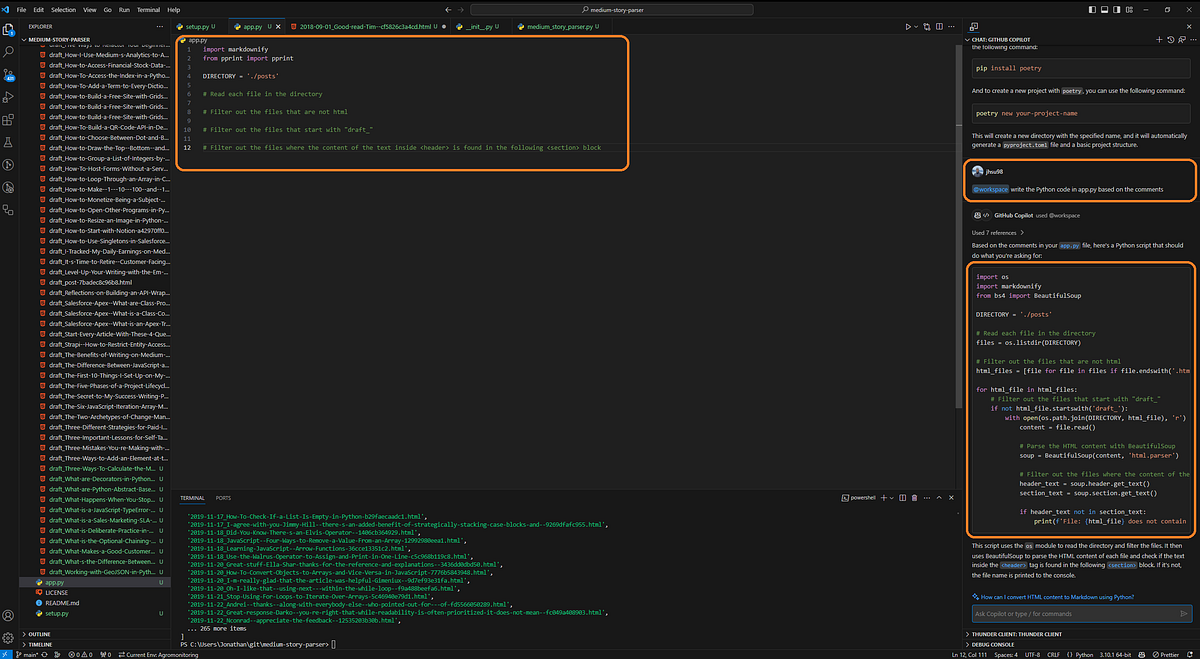
My final Copilot tip is I’ve gotten back into the habit of outlining my code with comments before writing it. Why? Because I literally ask Copilot to fill in the code for me.
Conclusion
I hope these tips help get you to the next level. Whether it be through writing more structured and repeatable code, adopting industry tools to standardize code quality, or leveraging AI to accelerate your work and/or make you more comfortable asking for help.
What are some of your favorite tips and ah-ha moments that you’ve had? What helped get you over the mental plateaus of learning to code? Share your thoughts and experiences in the comments below!