What is a While Loop?
Plain-language introduction with pictures and examples

No matter what programming language you start with, you’re likely to encounter the time-honored while loop. Although while loops are actually very simple, they are often met with apprehension because they coders’ first introduction to looping.
Well, have no fear. This explanation will use normal language, pictures, and easy-to-read code examples!
Answering “What” Before “How”
Many guides are over-eager and jump right into the code, but we’re not going to make that mistake. Let’s start by discussing the purpose of a while loop and identify some code-free, real-world examples.
While loops function by repeatedly executing a set of commands — simple as that. So, what are some real-world examples of while loops? The beloved New Year’s Eve countdown comes to mind, announcing the remaining seconds from ten to zero. Another example is the classic “I’m thinking of a number between one and ten” where the other player guesses numbers until the correct one is picked.
While Loops in Pictures
You may think the hard part is coming next, coding these real-world examples… but we’re not there yet. First, pictures.
Below is a flowchart illustrating the basic structure of a while loop. There are four objects in the diagram, the ones in green being the most important.
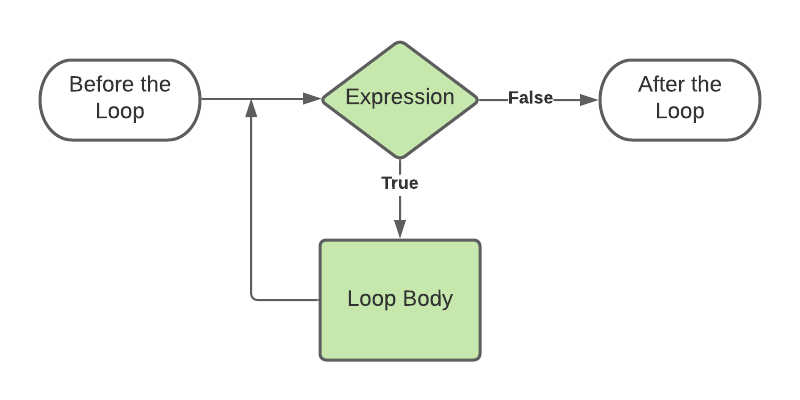
Sometimes a while loop needs some preparation before the loop. Next is the crux of the while loop and the toughest concept to digest. Computers are powerful, but they’re not mind readers. The secret sauce is being able to define a “yes or no” question that will determine if the loop commands will execute. This is the green diamond in our flowchart. When the answer to our expression is “yes” — or True — then we’ll execute the commands contained in the loop (our green rectangle). When the answer is “no” — or False — at that point we exit the loop and continue with whatever comes after the loop.
So, how do our previous examples look when modeled as a flowchart?
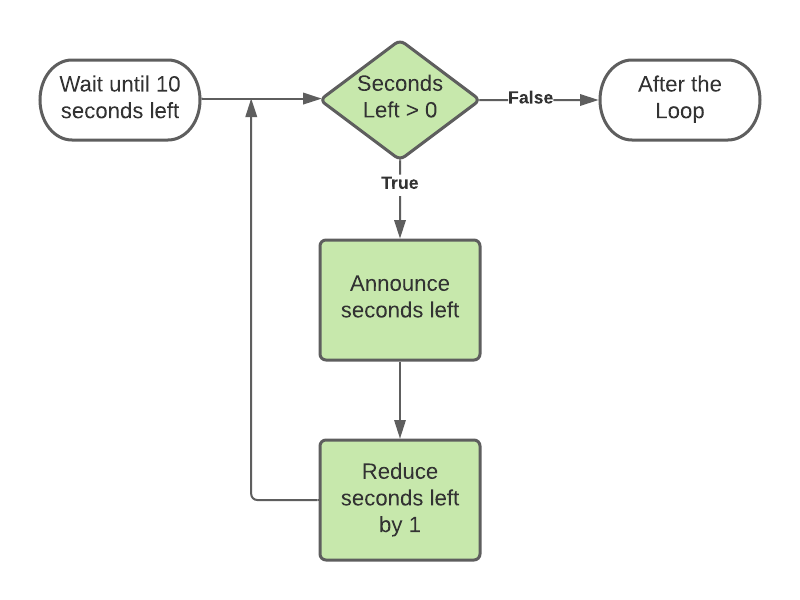
Did you notice that we specified to reduce the seconds left in a separate command? Remember, computers are powerful and good at following instructions, but they also need precise instructions to follow.

Our guessing game’s flowchart does not have the separate process for manually adjusting a value used in the expression. This loop does not have a built-in stop, the guesser must answer correctly in order to exit. Keep in mind this could have serious implications when writing a program because the loop may be infinitely stuck.
Programming While Loops
Alright, we’re ready. We’ve introduced real-world examples of while loops, illustrated the process, and identified the highlights. It’s time to code!
We’re going to build out each of our examples with the code written in Python. However, the concepts are universal and should be easily applied to any programming language.
New Years Countdown
We don’t want to be overconfident and just start coding; our first step is going to be to plan things out with comments.1. Define the start of the countdown
2. Write while loop with condition
3. Print seconds left
4. Reduce seconds left
Notice that 3 and 4 are indented; that’s because those steps are part of the loop.seconds_left = 10while seconds_left > 0:
print(seconds_left)
seconds_left = seconds_left - 1print('HAPPY NEW YEAR!')
The examples are very similar…slight differences in syntax, but overall the same structure.
Guessing Game
For our guessing game, we’ll go ahead and hard-code a value as the original number to keep the focus on our while loop. Remember, this loop will not have any hard stop, if the user decides to enter the same guess over and over, the loop will not exit.1. Set the magic number
2. Ask the player for their guess
3. Is the guess is incorrect? (our loop)
4. Ask the player for their guess
5. Print success message
Okay, we have our plan, let’s dive on in.correct_answer = 6guess = int(input('What number am I thinking of: '))while guess != correct_answer:
print('Wrong, try again!')
guess = int(input('What number am I thinking of: '))print('You got it, great guess!')
Reviewing our answer, there are a few things that don’t quite smell right… First, the idea of never exiting until a correct answer doesn’t make sense. Second, having to prompt the user in two separate places could be more efficient. Read on for some bonus code, combining our two previous examples and leveling up with a break statement.
Bonus Example
In this final example, we’re going to consolidate the input prompt and also add a maximum of three guesses. To accomplish this we’ll purposely use an infinite loop and delegate the exiting of the loop to an if statement.correct_answer = 6
guesses_left = 3while True:
guess = int(input('What number am I thinking of: '))
if guess == correct_answer or guesses_left == 1:
print('You got it, great guess!')
break
guesses_left = guesses_left - 1
print('Game over!')
Please share your experiences, questions, and feedback below. Follow Code 85 for more plain language programming guides. Thanks for reading!